

PRODUCT DESIGN CASE STUDY
Web App for Multi-Platform Campaign Creation
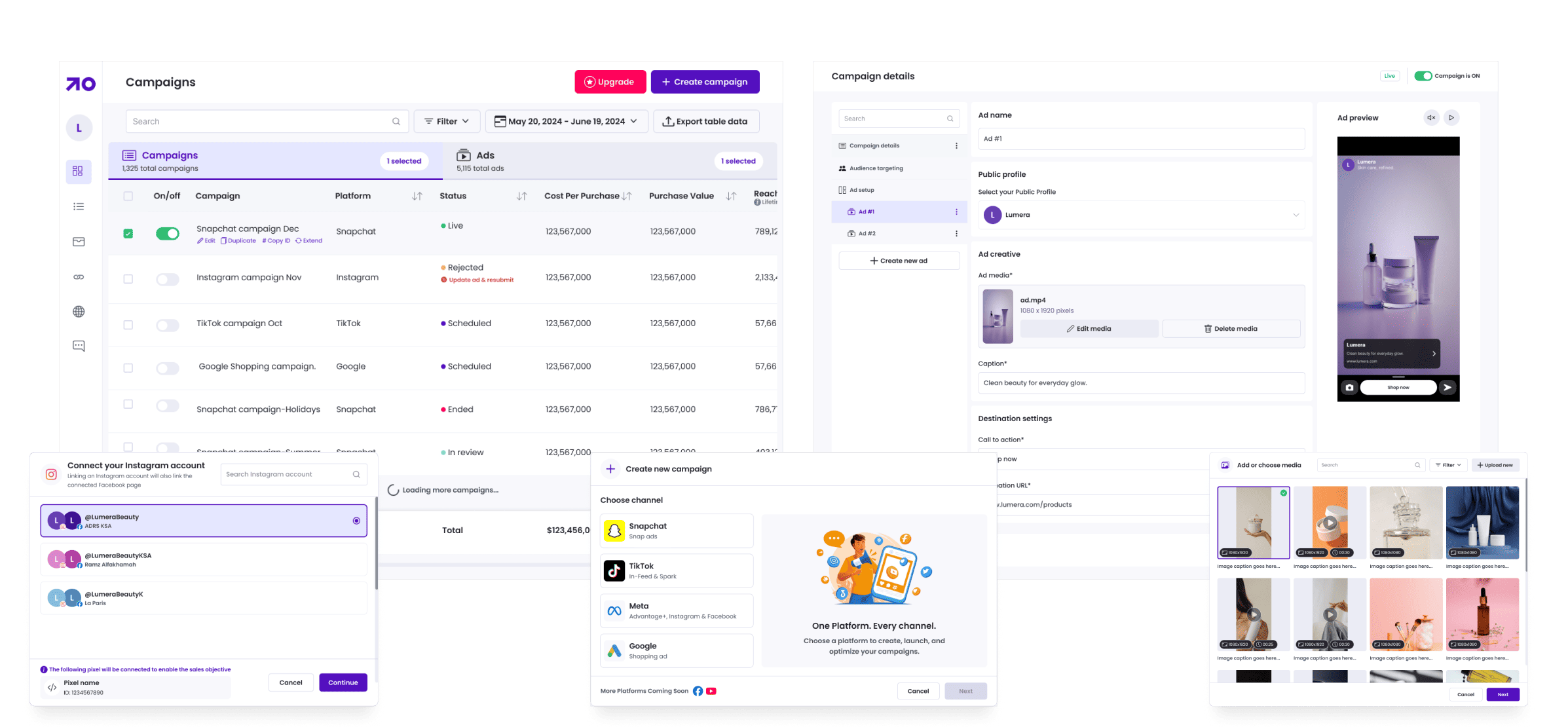
overview
Finiding the Problem
A fragmented, manual, and time-consuming process for multi-platform advertising.
Professional marketers and growing businesses needed a powerful desktop solution to create and manage ad campaigns across multiple platforms. Existing mobile workflows were designed for quick edits but were not suitable for advanced tasks such as bulk actions, product-based ad creation, cross-platform performance comparison, or integrations with business systems.
Campaign creation required repeated manual steps across separate ad managers. Reporting was scattered across multiple dashboards and spreadsheets. Connecting product catalogs, ad accounts, and store data involved multiple disconnected tools, which slowed execution and increased the risk of errors.
Key Issues Identified:
- Marketers repeated the same setup steps for each platform, leading to duplicated effort and inconsistent campaigns.
- Switching between Meta, TikTok, Snapchat, and Google slowed down workflow and introduced mistakes in creative and targeting.
- There was no single place to compare performance across platforms.
- Importing product catalogs and customer behavior data required custom workarounds.
- Desktop users lacked a dedicated pro workflow capable of handling advanced scheduling, budgeting, and analytics.
Research
Understanding pro marketers, their workflows, and integration needs.
To understand how campaign creation and reporting can be improved, I interviewed performance marketers, agency strategists, in-house marketing team and business development team. I also conducted workflow analysis on Meta Ads Manager, TikTok Ads Manager, Snapchat Ads Manager, and Google Ads.
Sources:
- 7 performance marketers
- 5 marketing managers
- Smartlook analysis of existing mobile workflows
- Internal discussions with support, engineering, business development, and sales teams
We followed up with a questionnaire to validate workflow bottlenecks and identify integration priorities.
Sample Questions:
Campaign Creation & Workflow
- How do you currently create and manage campaigns across multiple platforms, and where does the process slow you down?
- Which setup steps do you repeat across platforms that feel most manual or error-prone?
Reporting & Optimization
- How do you combine performance data from different ad platforms into one view?
- Which KPIs matter most when you compare channels week-over-week?
E-commerce & Product Integrations
- How do you prefer to select products for ads, and what catalog information do you rely on most?
- What challenges do you face when connecting your store or product feed to advertising platforms?
Platform & Account Connectivity
- How do you manage multiple ad accounts across clients or business units?
- What issues arise when switching between different ad manager dashboards?
Why Desktop/Web Over Mobile
- What campaign tasks require a desktop interface rather than a mobile app?
- Which parts of your workflow rely on having multiple tabs, dashboards, or data views open at once?
Pain Points & Opportunities
- What are the biggest bottlenecks in your current multi-platform ad workflow?
- Which tasks would you automate or improve to speed up campaign creation?
Key insights
What users need to work faster and smarter

Marketers want the ability to duplicate campaigns, templates, and ad sets without repeating platform-specific steps

They need one dashboard to compare results across all channels without switching tools

Product-level insights, customer purchase behavior, and catalog data are essential to building high-intent campaigns

Pro marketers prefer wide-screen layouts, more controls, and detailed scheduling features not possible on mobile
Finding a Solution
A web platform built for scale, speed, and pro marketer workflows
The solution was a desktop-first campaign creation platform that unifies multi-platform advertising into one simple workflow. It supports pro-level tools such as advanced scheduling, bulk duplication, and data integrations.
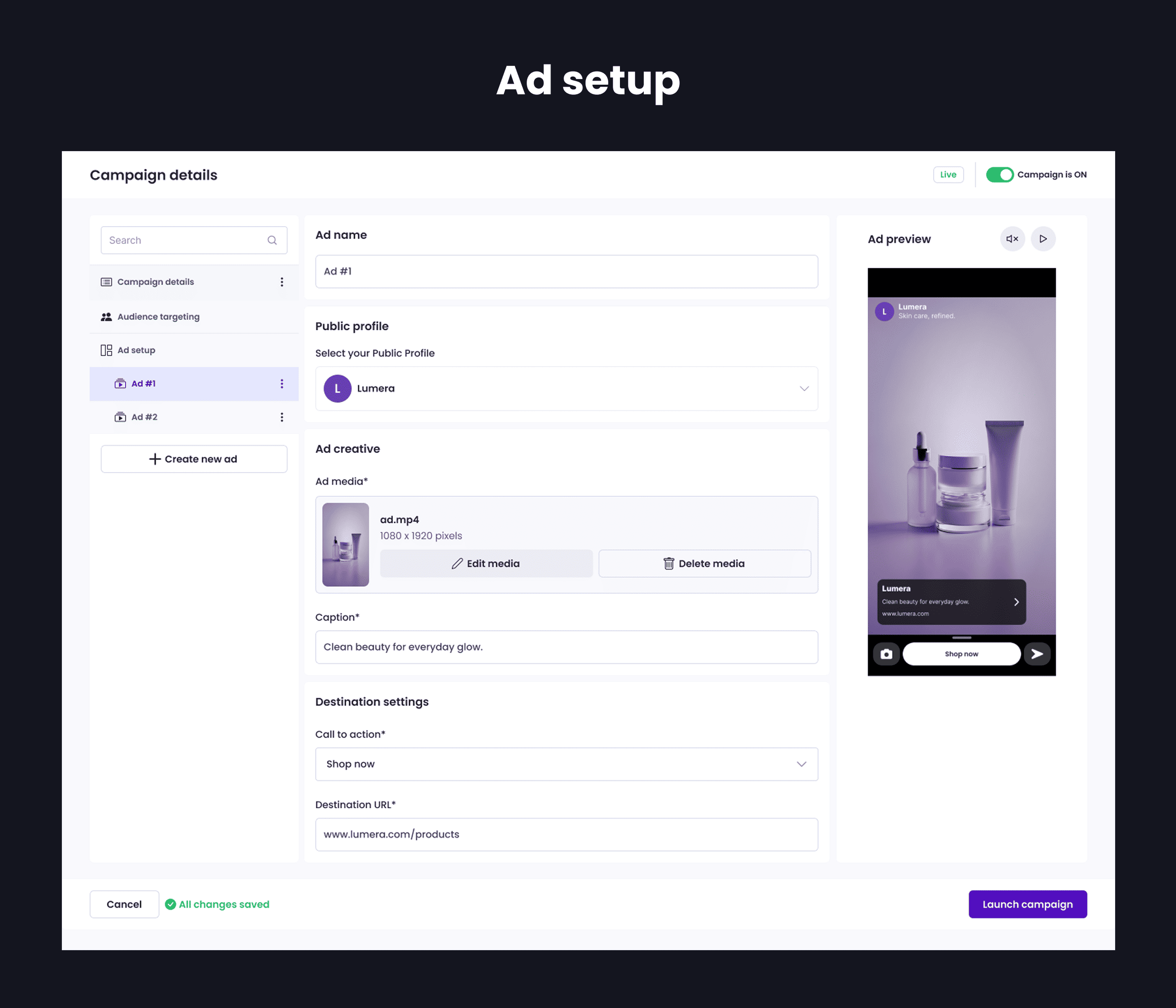
Create social media ads across Meta, TikTok, Snapchat, and Google in one place
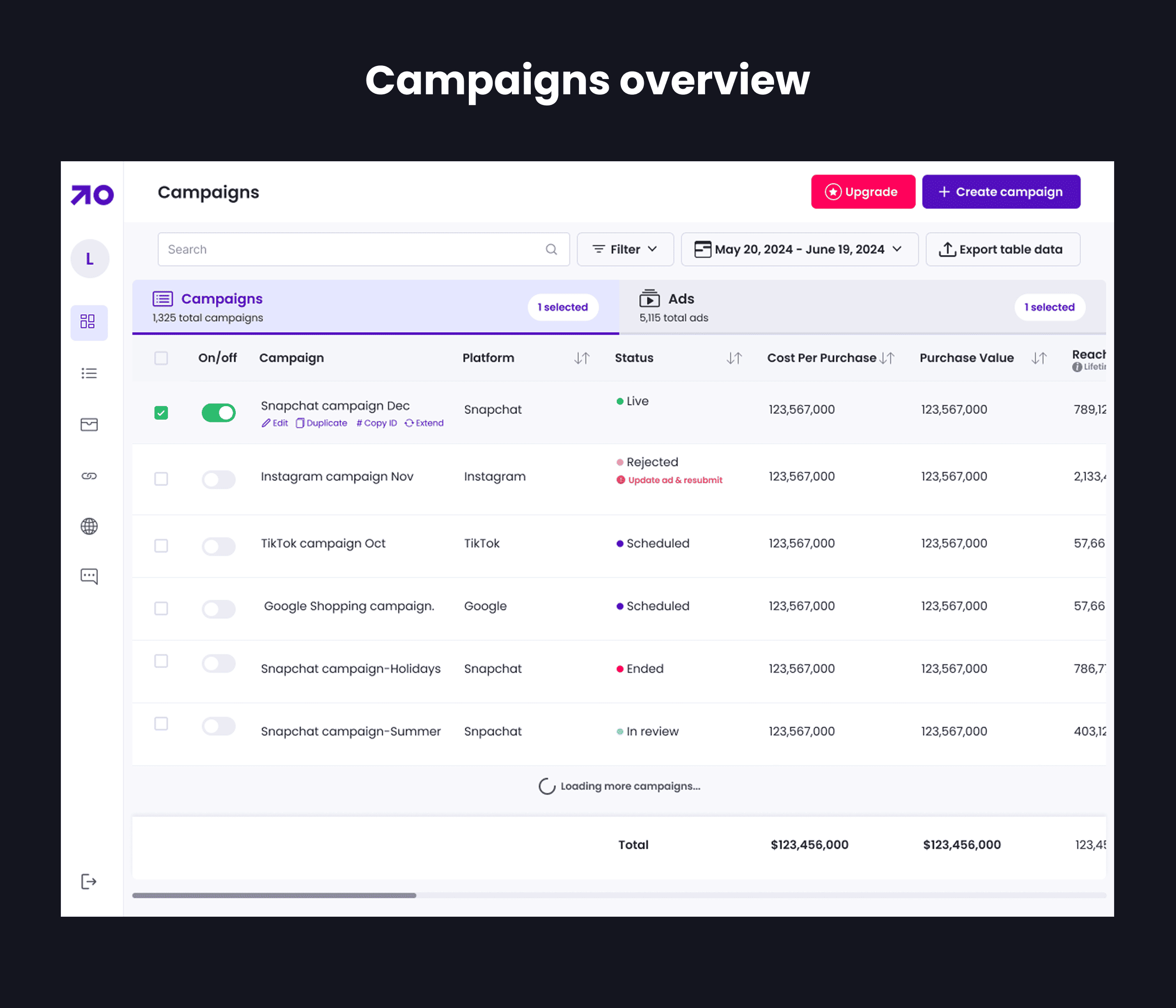
Centralize reports so users can evaluate performance across all platforms effortlessly
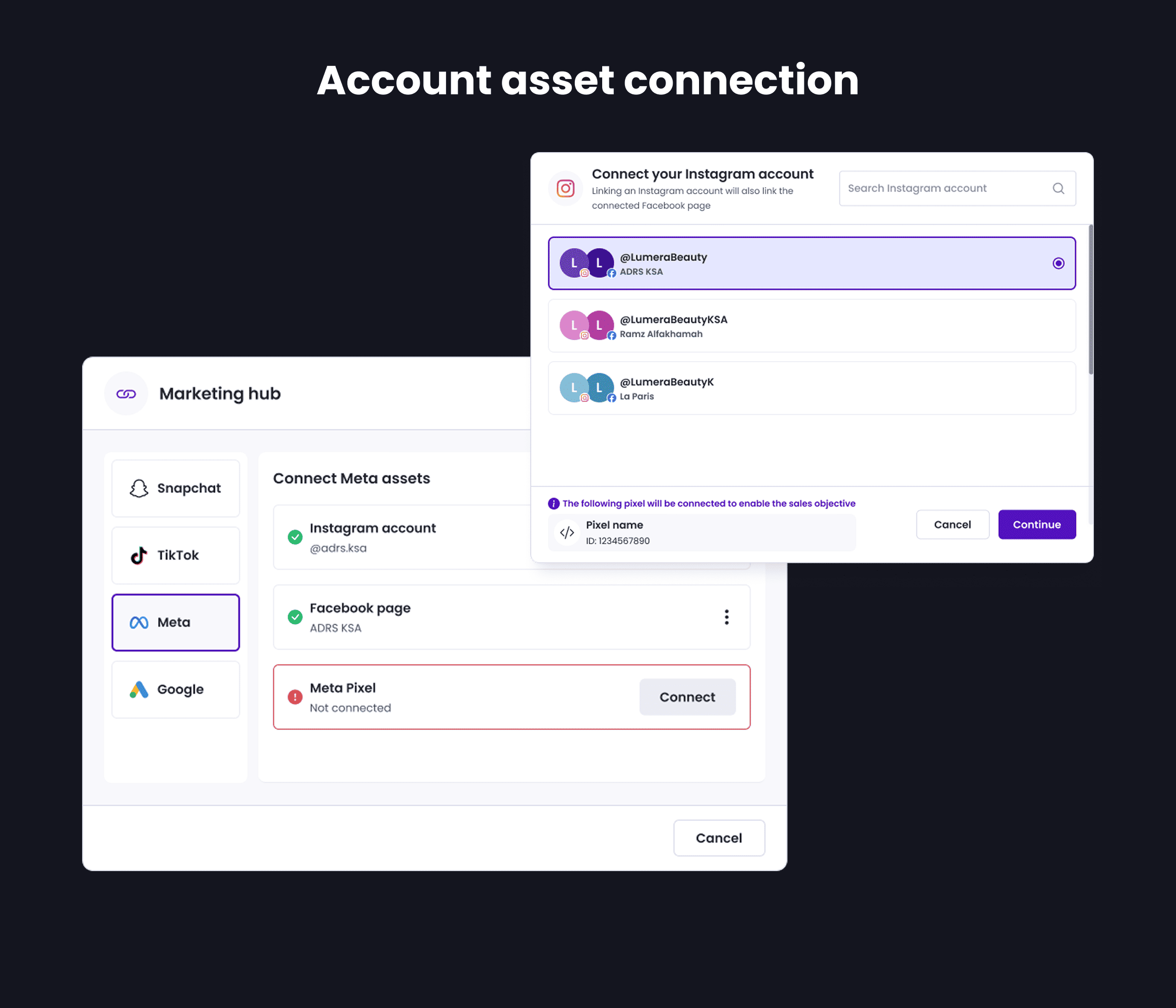
Offer quick access to connected ad accounts and existing posts
Allow integrations with e-commerce platforms to support product-driven campaigns.
Design strategy
Turning research insights into a pro-level advertising platform
Research insights directly shaped the strategy by focusing on clarity, simplicity, and detailed insights.
Part A: Campaign Creation Platform

Multi-platform campaign creation
A single flow where users can create ads for Meta, TikTok, Snapchat, and Google without jumping between different ad managers.

Desktop-first interaction model
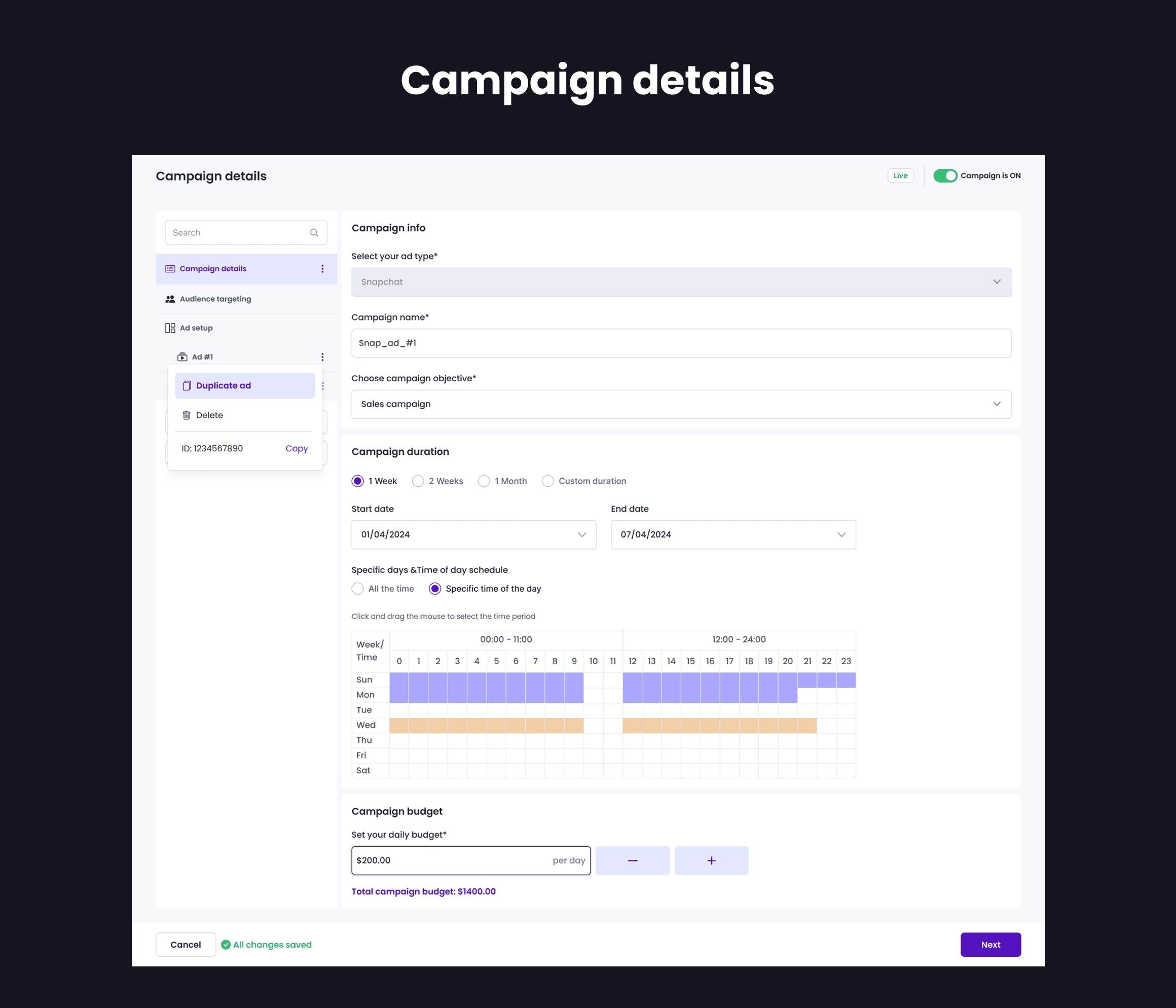
Wide canvas, advanced schedule grid, and quick toggles for status, pacing, and campaign-level controls designed for desktop efficiency.

Bulk actions and templates
Duplicate, bulk edit, or template campaigns and ads to quickly scale recurring promotions.

Seamless ad account connections
Easy integration with business ad accounts so users can access their content and published posts instantly.

Advanced scheduling and budgeting
A pro-friendly interface with time-of-day scheduling, multi-week planning, and pacing recommendations.

Cross-channel performance tracking
Users can quickly view performance metrics for all platforms in one consolidated dashboard.
Part B: E-commerce Integrations for Product-Led Advertising

E-commerce Platform Integration
Native integration with e-commerce platforms and stores enables faster ad creation, broader audience reach, and faster sales activation.

Behavior-Based Audience Targeting
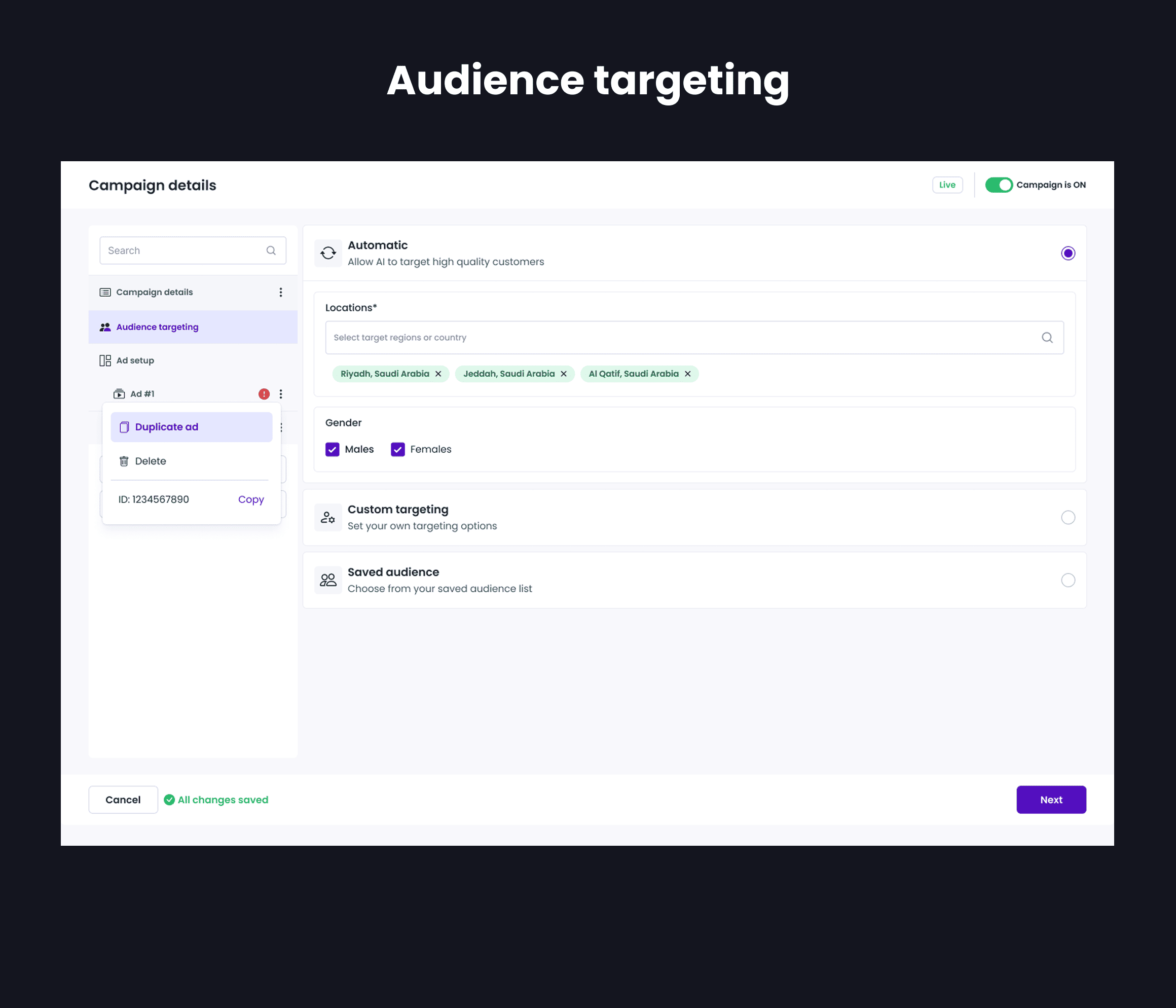
Leverage customer purchase history and behavior to create high-intent and retargeting audiences that boost conversion rates.

Direct Product Catelog Access
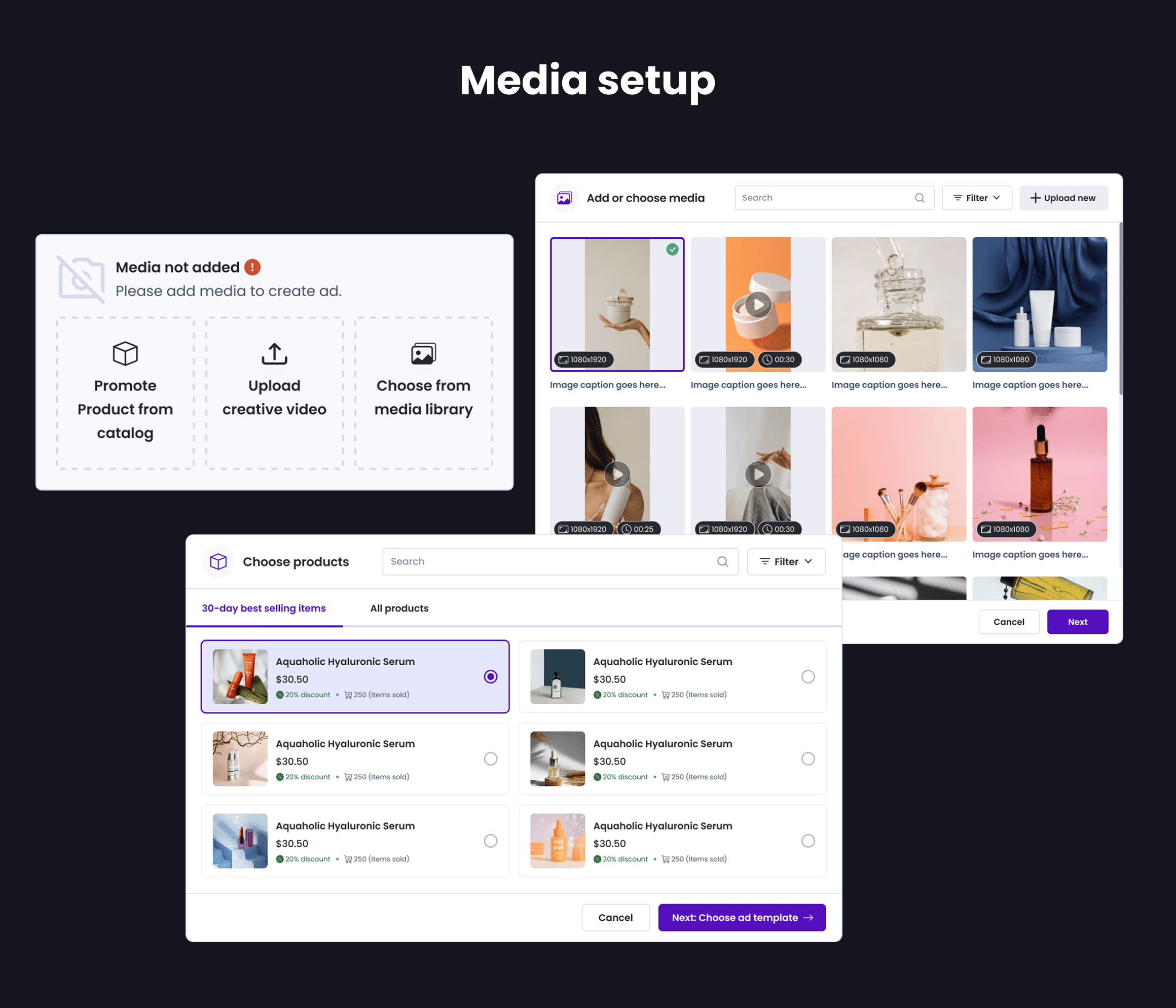
Access the complete product catalog inside the ad creation flow without switching tools or dashboards.

Product and stock insights
View product images, pricing, and real-time stock status to avoid wasted spend and promote the right products.

Faster Ad Setup with Pre-filled Product Data
Automatically populate ads using product metadata, reducing manual input and setup time.

Demand-Driven Product Promotion
Identify high-demand and top-performing products to prioritize campaigns with higher purchase intent.
Visual design
Mockups
Testing
Internal Alignment and Flow Finalization
Instead of running early prototype testing, we focused on aligning the product experience closely with real business and technical constraints.
- Validated campaign creation, budgeting, scheduling, and reporting flows against real-world advertiser use cases.
This approach helped reduce rework later in development and ensured feasibility from day one.
Staging Environment Rollout
Once the core flows were finalized, we moved directly into a staging environment.
- Built and deployed selected features in staging for early validation.
- Tested integrations with ad platforms and connected e-commerce stores.
- Conducted internal testing sessions with stakeholders, engineering teams, and select store users from integrated platforms.
- Gathered structured feedback on usability, clarity, and data accuracy.
This allowed us to evaluate the experience in a near-production setup rather than simulated prototypes.
Impact
Early Outcomes and Signals
Improvement in campaign setup efficiency during internal staging rollout, measured across validated desktop workflows.
Increase in feature adoption among internal teams and partner stakeholders during staged testing cycles.
Additional outcomes
| Metric | Before | After |
|---|---|---|
| Campaign Setup Time | Manual, fragmented across platforms | Reduced by ~35% using a unified flow |
| Setup Errors and Rework | Frequent clarifications and retries | Dropped by ~40% after flow simplification |
| Cross-Platform Visibility | Siloed dashboards per platform | Single consolidated performance view |
| Stakeholder Validation Score | Informal feedback | 85% rated flows as clear and intuitive |
| Engineering Rework Cycles | High due to unclear requirements | Reduced through early flow alignment |
Final thoughts
Optimizing Multi-Platform Ad Creation.
This project highlighted how thoughtful UX can directly improve efficiency, scalability, and trust in complex marketing tools while delivering real value to users. By simplifying multi-platform workflows and reducing manual effort, marketers are able to launch, manage, and evaluate campaigns faster with fewer errors and less cognitive load.
Early collaboration with engineering and business teams helped reduce friction at both the user and system levels. The staging rollout validated key assumptions and showed strong signals that the product can meaningfully support users in making confident, data-driven decisions as the platform scales.
